As the snows begin to melt -- they aren't all gone yet, oh no -- the winter aconites along our front walk begin to bloom.
They our reliable first flowers of spring, and a very welcome sight they are. Winter is drawing to a close with the colorful promises our aconites are making. Here's a closeup.
Thank you, guys! Thank you for enduring the frosty mornings and for saying hello.
With the first power-on, juno responded as hoped: the BIOS identified all the peripherals correctly, and then noted that no device contained any operating system to boot. I did a restart and went into the BIOS to change several settings (time, splash screen, boot order, etc.) and rebooted with a CD. Or rather, I tried to reboot with a CD. Even though I tried several bootable CDs, juno refused to even try to boot from them. It was as if juno would boot only from the first device and failed to check the others. Time to go into the BIOS again. But wait ... the system no longer responded to the DEL key. I couldn't get into the BIOS, even with several attempts! Eventually I had to switch a jumper to reset the motherboard to its factory default settings, and then, as if having enjoyed the attention, juno has never since failed to recognize a bootable device (including a USB memory stick) or to respond to the DEL key. I have changed most of the BIOS parameters again (one at a time), with no ill effect. Sometimes I think computers must go through a learning process when they first wake up or move to a new environment, and exhibit behaviors that disappear after a single baffling appearance.
The first job was to properly set up the SSD (solid state, or flash memory, drive). Including this part was one of the two less conservative items in juno's constitution. SSDs are relatively new, and early adopters (the last 18 months) have seen drives that slowed down over time, turned into expensive paperweights after applying a manufacturer's upgrade, and so forth. By now I hoped that the worst problems had been solved (or identified) by the truly early adopters. Because these devices, although blazingly fast compared to spinning platter hard drives, are very expensive, I stuck to a 40GB 'value' model by Intel (the writes are much slower than the reads, although still faster than a hard drive). I had to create a bootable CD from an image downloaded from the Intel website, in order to upgrade the device's firmware. Fortunately, this went without a hitch. Then I booted Ubuntu from a memory stick, and manually partitioned the SSD, not leaving that to the automated install. It gets very technical, but it's a good idea to align the partition with the SSD erase-size boundaries, and where possible, make file systems in those partitions with tweaks that also are driven by the erase block size. I hope that the next time I build a computer the SSD quirks will either be fixed, or compensated for by the operating system.
Then the Ubuntu install began. Here is the second of my two "leaps" -- I was installing 64-bit Ubuntu. Microprocessors began to have 32-bit capability in the mid-1980s, and 32-bit addresses meant that they, and programs that ran on them, could theoretically recognize up to 4 gigabytes of RAM. For the last several years processors have had 64-bit capability, although consumer machines typically continued to run with 32-bit operating systems and programs. However, with memory becoming cheaper and cheaper, and programs and data sets becoming larger and larger, 4 gigabytes of RAM could be a limitation. Also, for some tasks the 64-bit versions of the same program can be faster than the 32-bit. I decided to take the plunge and install the 64-bit version of Ubuntu with 4 GB of RAM in juno. For technical reasons that are historical -- PCs just grew that way from their origins in the 1970s -- a 32-bit operating sytem would actually be able to use no more than about 80% of that 4 GB.
The install went smoothly. (One does always need to tweak and individualize things.) I had been most apprehensive about Adobe Flash, because Adobe Flash for 64-bit Linux was available only as an 'alpha' to be downloaded from Adobe's web site. However, so far this has worked flawlessly, beyond my expectations. The other 64-bit issue was that there is no 64-bit version of Google Earth for Linux, at least not yet. Some have gotten the 32-bit version to run on a 64-bit system with some extensive workarounds, but for now I'm content to wait for a real 64-bit version.
At this point I noticed some oddities. The CPU temperature was 42°C, which I thought quite high for idle. Then I discovered that it was always 42°C, regardless of load or CPU speed -- the sensors were stuck. I gather this is a not-common but not-rare fault in some of the Intel processors of this generation. At least I was getting good temperature data from the combined controller and integrated graphics chip (nVidia MCP79), and from the 500 GB hard drive, so if things were getting hot I would have some warning.
The next oddity was that the BIOS showed my 1150rpm fans running thousands of RPMs faster than that:

Another sensor issue, fan quirk, or BIOS flaw, no doubt. It doesn't reduce the functionality of the system. I usually adjust the fan speeds several times at the beginning, to reach a balance between low-enough noise and good-enough cooling, and then leave them alone.
Through all this work the blue LEDs for the power button and the disk-activity indicator were bugging me. They were way too bright! So I put a little electrical tape over the disk activity light, blocking most of it, and put a disk of black construction paper in the center of the power button.
Here are a couple of images of at juno at work (taken with flash).


I should point out the small keyboard. It's a "Happy Hacking" keyboard for people, such as me, who don't use the numeric keypad, or have a small desk space, or prefer the traditional UNIX key locations for ESC, CONTROL, and the insidious CAPS LOCK.
Regarding the "faster" goal, I don't have any handy Linux benchmarks. Of course, with the SSD, booting now takes only 31 (plus or minus) seconds from power-on. Of that, 19 seconds are the motherboard waking up devices and taking inventory, and only 12 seconds to boot Linux and put up the login screen. Applications start a lot faster too. Let's just compare the specs. The prior computer, tbroma, had a CPU running at 2.13 GHz with a 667 MHz FSB (memory interface) and DDR2-667 memory. Juno runs at 2.93 GHz with a 1066 MHz FSB and DDR2-800 memory. It's gotta be faster!
What about the final goal, "cooler"? Well, tbroma would draw 42 watts when started up and logged in but not doing anything in particular, a state referred to as "idle". juno draws only 30 watts, measured by the same kill-a-watt meter. When running a CPU stress test program (from the Mersenne Prime search), tbroma, in the days when I could undervolt it, drew 77 watts. In the last year, when undervolting through Ubuntu finally became just too difficult, tbroma reverted to drawing 90 watts. juno sips 63 watts under that test.
And here's one of the best surprises. In tbroma's early days, I tried to get 'sleep' to work. Joan's iMac does 'sleep' very well; just hit a key or move the mouse, and in two or three seconds your desktop is back. I could never get tbroma to wake up properly from a sleep; it always thought it had been rebooted without a proper shutdown. Perhaps it was the motherboard, perhaps it was the operating system of three years ago, but I gave up on it. Guess what? Sleep on juno works, although it is not as slick as the iMac. I must press the power button, and eleven seconds later, after a few messages flash by on the screen, too fast to read, my desktop is back. (Complete with 'network disconnected' and 'network reconnected' notifications.) While asleep, juno draws only 5 watts! Heck, the power drain for just being plugged in while off is 4 watts. I've got juno set to automatically go to sleep after 30 minutes of no activity.
Can I repeat "faster, smaller, cooler" in two or three years? I think so. Smaller will be the biggest challenge, but it can be done, as with this system, which is about the same width and depth but shorter than juno. As infrequently as I use the CD/DVD drive, I could employ an external optical drive on those occasions where I needed one, which would free up space and reduce the cable count. As components get smaller and more capable, where's the limit?!
As unlikely as it seems, a squirrel has been carrying leaves for nesting to the owl tree, stuffing them in a hole several feet below the owls' cavity and perhaps 90° offset. Yesterday the squirrel, confident in his maneuverability, perched on a stubby branch just on the other side of the owl.
The owl knew the squirrel was there, and also knew that she was better at snatching critters on the ground than squirrels in a tree. Eventually she decided to fly off to the nearby pine tree in which she likes to pass the time of day while keeping an eye on the nest. Her departure alarmed the squirrel.
I have no idea what the outcome of this proximity will be. What do you think will be the ending to the tale of the owl and the squirrel?
Juno is my new computer. It's named after the asteroid, not the movie -- I saw a news item about the opposition of the asteroid Vesta, and thought that among the four major asteroids (Ceres, Vesta, Juno, Pallas) that I liked the name Juno best.
I wasn't planning on building a new computer for at least another six to ten months, but my three-year-old machine, tbroma (short for theobroma, "food of the gods," a reference to chocolate) had developed a quirk. Nine times out of ten, when turning the computer on, it would have a) forgotten what time it was, and b) disabled the network interface (no Internet). This fault is typical of a weak CMOS battery, but I changed it twice and the problem persisted. I would have to intercept each boot to fix the settings in the BIOS, so it was time to accelerate my schedule.
I won't bore you with parts selection; as always, I found the Silent PC Review web site invaluable. Joan will tell you that I peruse the forums there almost every day. My goal was faster, smaller, and cooler (less electricity) than tbroma. With three years of technology advances, I ought to be able to do all three.
Here's a view partway through the assembly process. The CPU heatsink and fan are mounted on the motherboard, front fan attached, and cables from the front ports and status lights plugged in. A 2.5" (laptop style), 500GB hard drive is attached to a plastic frame (slot rafter). The rafter is supposed to snap into the orange expansion slot at the bottom of the board, but that would put the drive and plastic tabs where they blocked parts of the motherboard. (The rafter is cut to 60% of its original size because that's all I needed.)

The two plastic gadgets at the front and back (not permanently mounted yet) are fan controllers that let me dial the fans up and down in speed, to get the best balance of cooling and quietness.
The tray for the slim optical drive blocks a lot of the case from the top, so it was usually kept to one side, and the fit checked now and then.
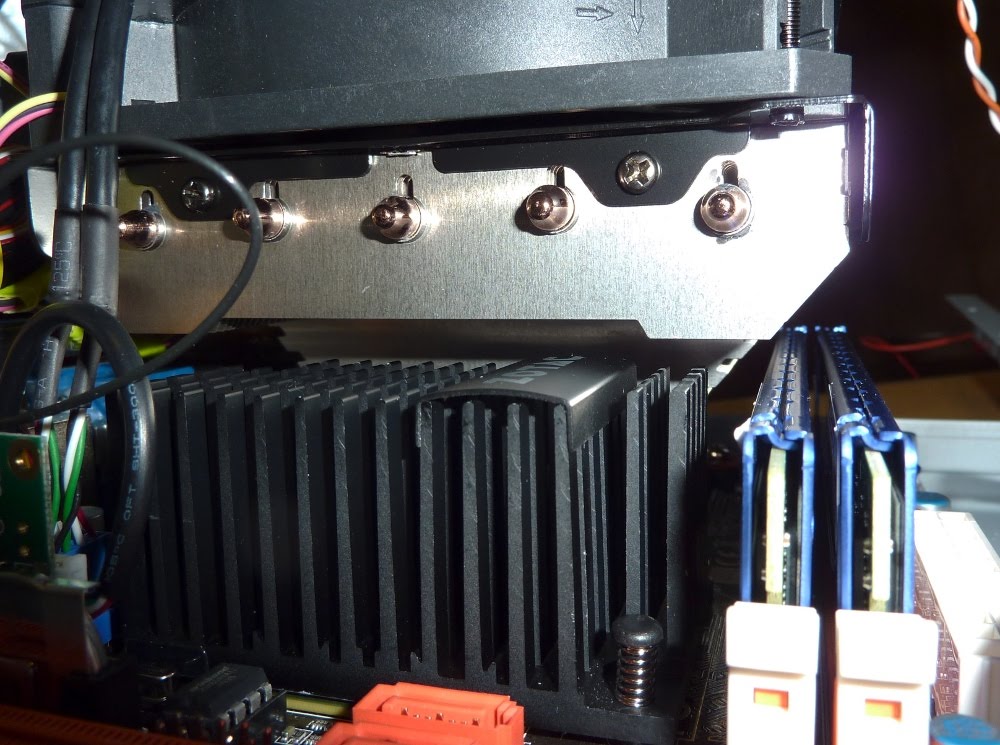
The heatsink is a mid-size aftermarket model, the CoolerMaster Gemini-S. Here we see that it clears the northbridge heatsink and the memory cards, but not by a whole lot. Install the memory cards first!
Some CPU heatsinks mount to the motherboard with a push-pin system (similar to the one you see on the black northbridge heatsink above) that many find awkward. This one attaches with a nice, solid backplate and screws. You add the screws that are going to pass through the motherboard to the clips (shown below), screw the clips onto the heatsink, and then fasten from the back side of the motherboard; even though there are more steps involved than with pushpins, you're never required to do difficult things in tiny spaces. The screw shown below actually threads through the hole in the clip, so it's solidly attached when you're handling the clip.
To gain efficiency and room for the larger heatsink/fan assembly, I replaced the power supply that came with the computer case with a picoPSU. The AC-DC conversion is done in an external brick, just like when plugging a laptop into the wall, and a small voltage converter plugs into the power socket on the motherboard.

Here I've circled the port on the picoPSU that lets you plug in an additional cable set. Unfortunately, it points straight back at the blue memory heatsinks, only 1mm or 2mm away. I could plug the cable set into this port, but the cables visibly pushed against the memory and back against the picoPSU, so I dropped that approach and got a cable splitter to turn one SATA power cable into two.
Here's a look into the top as I transitioned into the cablegami stage. The fan controllers are permanently mounted, and the CPU power cable snakes around the heatsink (required an extension!) The splitter cable is in evidence at the edge of the heatsink, and the 2.5" hard drive has its data and power cables plugged in. But nothing is tidy(ish) yet.

Just to emphasize the complications from the optical drive, here's a photo. Look at the length of the optical drive power and data cables -- they're intended for much larger cases. I'm using a case for mini ITX motherboards -- smaller than a micro-ATX motherboard, which is smaller than standard ATX. You'll see exterior shots later of my earlier, micro-ATX case and this mini ITX case.
Here's a shot of the left side after some cablegami efforts. The Y-splitter, power cable headed for the picoPSU, one of the optic-drive cables, and the CPU power cable are all tucked in the 1" gap between the plastic raft and the edge of the case. Similarly, the black data cable to the second storage device, an SSD (solid-state drive, using flash memory) takes advantage of that gap.
Looking at it from the right side, we see that the airspace in front of the fan is more or less clear of cable clutter. The small wires are below the airpath. (The SSD is in the small bay hanging from the bottom of the optic drive tray.)
Here, the case is buttoned up. Black mesh (window screen material) is backing the vented areas to protect against dropped little screws and other disasters. I also used it to cover the hole where the original power supply was installed. Black construction paper (think scrapbooking) blocks part of the left vent to match the right vent. I don't have a high-powered graphics card throwing off heat on the left side, so it's best to focus the airflow where it's going to be needed. (The color differences are exaggerated by the photo flash. It's a decent match in ordinary light.)
Here is juno positioned next to tbroma, still in use. My computing philosophy now emphasizes compactness in all things except monitors!
Now it's time to power juno up, see what happens, install Ubuntu 9.10, and move my files over.
Last evening, twilight time, Joan and I heard odd hooting sounds in the woods. Something(s) were communicating back and forth, and our first thought was, "Owls?" We stepped out onto the deck, and backlit against the western sky was the unmistakable silhouette of an owl! We were excited, to say the least. In a way, this post brings me full circle, because it was our encounters with the barred owl family that inspired me to start a blog. We knew that barred owls tended to be loyal to a territory, and that they had raised two chicks last year, but we still felt lucky that just maybe they would be back again.
This morning exceeded our expectations. A "mob" of blue jays were scolding and scolding from trees near the owl sycamore, and hopping around the owl burrow. They were joined by a bunch of other birds, all of whom were flying around that sycamore and "buzzing" the cavity. This went on for ten minutes or more, and even after the blue jays left, a little downy woodpecker just wasn't going to quit. She kept sidling up to the hole in the tree, then hopping/flying over to the opening and, at least a couple of times, peering down the hole before landing on the tree trunk. She kept up that circuit for another five minutes or so, as if she liked giving herself a good scare.
And then the owl came out of the burrow for a breath of air. I grabbed some quick photos, which are a touch blurred because they were taken through a window.
Considering that this is the exact same tree and cavity that they used last year, it looks good for more owl chicks this year.
We do wonder at the number of predators in these woods: the red fox pair, the owls, and a pair of red-tailed hawks that visit several times a week. Later this morning one of the red-tailed hawks lit ten feet from the owl tree and stared at it for a long time. They may not appreciate having competition from other predators, perhaps? Would the owl parents consider a fox kit a tasty morsel? Stay tuned.
Our arrival back in Paro was on New Year's eve. We knew we had an early morning the next day to climb to Taktsang, or Tiger's Nest, one of the most sacred temples in Bhutan, perched 2300 feet above the valley floor. Joan and I had a special interest in this visit, because in 2005 our group had squeezed the Taktsang hike into the end of a day that started in Thimphu. Several of our group had reached the main viewpoint, across a deep gorge from Taktsang, but failing daylight meant that there was no time to visit. Now, on New Year's Day we would visit the site sanctified by Guru Rinpoche. What an auspicious way to start 2010!
It dawned clear, calm, and frosty at the Zhiwaling.
After breakfast, Tshering drove us to the parking area for Tiger's Nest. We were in the shade for the first part of the hike, and gloves and jackets were the order of the day. As both we and the sun climbed higher, our bodies warmed up with the exertion, and once we hit the sun line it was time for me to stuff a layer or two into the daypack. At one switchback there was a look-ahead to our goal.
As we climbed higher we could look back down into the Paro valley.
Halfway up there is a teahouse, providing hot drinks, sweet crackers, and a pit stop. We regrouped and caught our breath for the second half. Here is a view of the teahouse among the trees, just before we reached it.
When most of the climbing is done, you reach a shoulder where there is an open ground with prayer wheels and prayer flags. Here you see the view as I'm about to reach it; the ground is still frosted in the shade.
A view of the grounds.
The prayer flags glowed in the early morning light.
From here until the main viewpoint the trail was a rolling level. Along the way there is a shrine dedicated to the previous Je Khenpo (religious leader of Bhutan).
He was born up here.
Tsewang told us how the Je Khenpo's body had gradually dried out, or otherwise gradually transformed itself, after his death; there had been no embalming but there was no decay. Tsewang has seen the body himself.
At the threshold of the viewpoint, Jillian proved to be a soft touch for the canine pilgrims.
We paused for a group photo with our goal in the background. (Did Namgay stay up late to see in the new year?)
You could look back and see the teahouse.
After a few steps there was a temple dedicated to Yeshe Tsogyal, a female disciple and chronicler of Guru Rinpoche, who gained Enlightenment while on retreat in this spot.
This is slightly out of order, but here is a good view looking back at Yeshe Tsogyal's shrine and our path down from it towards the gorge crossing.
From those steps, the temple was tantalizingly close.
A view looking out from the middle of the gorge.
Many have come this way over the centuries; today, we were among the first.
And now we have a pictorial gap, for no photographs are allowed anywhere at Tiger's Nest. There is a guardhouse just before you reach the complex, and everything -- walking sticks, day packs, camera, and, we discovered when we tried to walk on, even binoculars must be left behind at the little plaza beside the guardhouse. This intense security may be partially due to the "southern Bhutanese problem" and suspicions about the accidental fire in April 1998 that destroyed Tiger's Nest. (The temple was rebuilt with donations from all over the Buddhist world and reconsecrated in March 2005. I can't imagine the difficulty of rebuilding up here.)
Soon after entering we visited a large stone with an imprint or depression. The visitor is encouraged to stand at a starting line, close his or her eyes, step forward, and attempt to put their own thumb into the imprint. The rock-slab floor is uneven so it's no easy matter! None of us made it.
Then we visited three shrines of the several in the extended temple. A young girl, part of a family of what must be caretakers, unlocked each shrine room and administered the blessing water. We had an opportunity to sit and absorb some of the silence at the second shrine. At the final shrine we received a miniature dorje from a monk, on a string to be worn as a pendant around the neck. It is a reminder of the supreme indestructibility of knowledge.
After an hour or so we left the Tiger's Nest. It was an immensely satisfying visit after having fallen short in 2005. Here are a couple of looking-back views, with better light now that the sun is higher in the sky.
One our way back down to the teahouse, there was a good view down to our hotel in the valley. This picture is zoomed-in to magnify the hotel.
At the teahouse we regrouped yet again, and had hot tea, and were visited by avian pilgrims. My best guess is that this is a rufous sibia.
Near the bottom of the trail, now in bright light, were three water-powered prayer wheels.
After lunch at the Zhiwaling, we did some shopping in Paro. Joan and I spent most of our time at Chencho Handicraft, a workshop and outlet for weavers, invariably female, from more rural parts of Bhutan. Later we also spent some ngultrum at the hotel gift shop, which also had marvelous fabrics. Sadly, part of the afternoon was also dedicated to repacking. No longer would our luggage be slung into the back of a bus, but tomorrow it was going into the hold of an aircraft, with all of the reorganization that implies.
Our trekking group had a private farewell and recap dinner. Most of us started with Dragon Warmers, a drink that (we were told) was invented by a Yangphel Adventure guide. Bhutanese army officers receive a liquor ration -- sounds very British -- named Dragon Rum. A Dragon Warmer is based on hot apple juice, with Dragon Rum (or any rum that is handy) and a little lime and honey added. Cinnamon optional.
Tsewang gave us a slide show based on the pictures he had taken of our last two weeks, and it was warmly received. After dinner, each of us had a chance to speak to our experiences on the trek, and we were universally appreciative. Tshering played a couple of traditional tunes for us, and sang as well. (He's a very talented guy as well as an expert snowball thrower.)
Eventually the evening wound down, and we all returned to our rooms to finish packing. It was our farewell to Jen, who had an extremely early flight in the morning. Jim, Jillian, Joan, and I were on a late morning flight, so we were able to keep normal hours. At the airport, both of Druk Air's Airbus jets were on the tarmac; Jen's flight to India had already returned.
After a refueling stop at Bagdogra (the planes do not take off with full tanks of fuel, because of the challenging location) we found ourselves back in Bangkok. At 4:00AM the next day we took the shuttle to the airport, and were through initial security by 4:30! Because of the "Christmas bomber," there were additional pat-downs or wandings at the gate in both Bangkok and Tokyo, but everything worked as well as could be expected. Note: there is an origami museum/shop with some astonishing exhibits across from gate 26 at Narita.
Our luggage did not make the two-hour connection in O'Hare; the baggage recheck area after customs was swamped and the staff told us to just drop off the baggage carts and keep going. This spared us from doing laundry on our first day back, and the luggage arrived home safely 23 hours after we did.
It is difficult to summarize such a varied and richly packed journey. We experienced trekking, flora and fauna, cities and villages, home visits, architecture, crafts, dances and festivals, temples and shrines. Not to mention butter tea, ara, and the fiery chili and cheese national dish, ema datsi. Joan and I were blessed with great traveling companions and skilled and thoughtful guides. It will take a while to digest the trip, but writing this blog has helped that process along. Inevitably I will have omitted some things that I should not, but no casual account such as this can be comprehensive. Joan and I intend to return to Bhutan in a few more years, this time in warmer weather, to enjoy more of the flowers and birds. We've done November and December now. And we have every intention of going again with Geographic Expeditions (as long as they use Yangphel Adventure Travel).
To all of you who have kept up with this account, may I say "Kadinchey La" (thank you).
Sitting at our kitchen window, waiting for today's snow to start (it hasn't stopped yet), Joan spotted a pair of red foxes investigating the woods. One chewed on the frozen leg of a deceased groundhog for a while, but gave it up. They did some pouncing in the snow, but I don't know if they caught anything or not. I shot some pictures through the window. As usual, click to enlarge.
Licking a paw (they don't want stuff to freeze in between the pads of their feet).
Taking a brief pause.
Almost hidden by the trees.
Is there something in its mouth?
Standing at attention (there is a fenced-in dog two houses down from us).
Trotting through the snow pack.
They made it a very exciting morning for us.